As an Amazon Associate, we earn from qualifying purchases. This helps support our site at no extra cost to you.
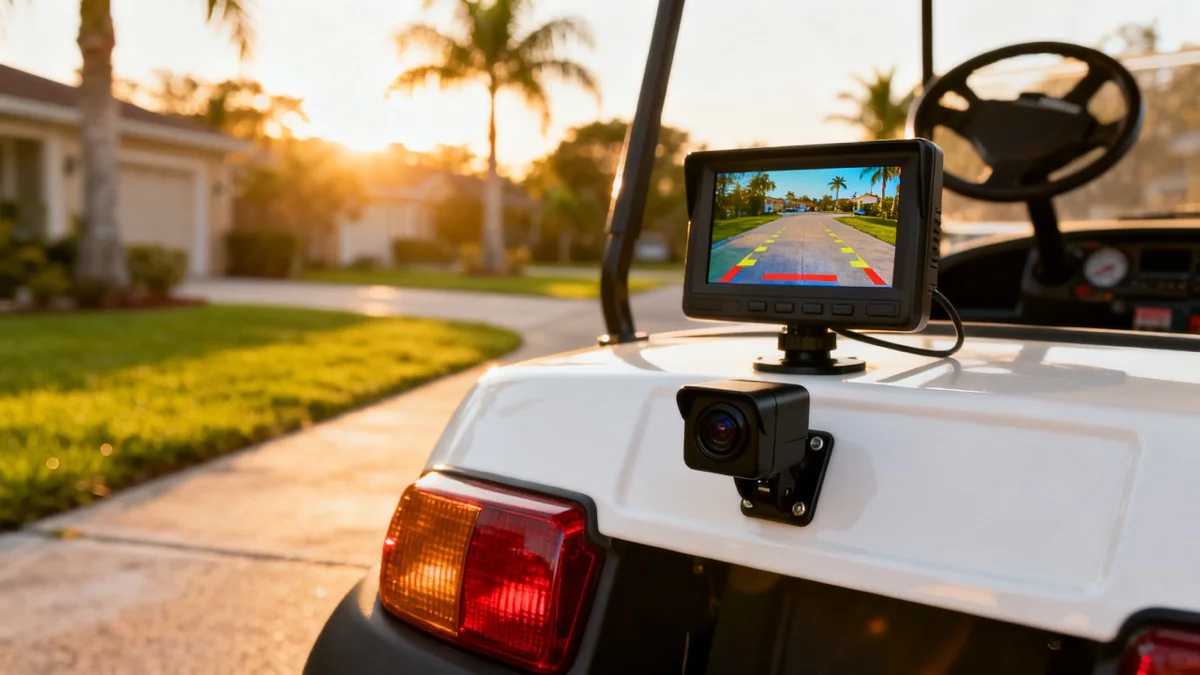
The best backup camera for a golf cart depends first on power. Choose a rechargeable wireless kit for the simplest install, a wide-voltage wired kit only when its documented input range matches the cart, or a 12V wired kit powered by a correctly installed reducer. Keep mirrors and physically look before reversing because a camera is an aid, not a substitute.
Many camera kits expect 12V, while electric carts commonly use 36V, 48V, or a higher pack voltage. This guide compares camera types, fit checks, and safe installation paths for Club Car, E-Z-GO, Yamaha, and other carts.
Backup Camera for Golf Cart: Quick Answer
| Search | Best Answer |
|---|---|
| Backup camera for golf cart | Choose by power first: rechargeable wireless, documented wide-voltage input, or 12V through a reducer. |
| Golf cart back up camera | Same product category as "backup camera"; use this wording when shopping, but verify voltage before buying. |
| Golf cart backup camera | Verify input voltage, fuse instructions, outdoor rating, viewing angle, display placement, and mount fit. |
| Golf cart camera | For reversing only, use a rear camera; for constant driving awareness, keep mirrors too. |
| Golf cart cam | A small rear cam is useful for low obstacles, pets, kids, curbs, and rear-seat blind spots. |
For the full safety setup, pair this with our golf cart mirror guide, voltage reducer wiring guide, dashboard tech guide, and family safety guide.
Wired vs Wireless vs Phone-Based: Which Type?
There are three ways to add a backup camera to your golf cart. Each has trade-offs.
| Feature | Wired | Wireless (Battery) | Phone-Based (WiFi) |
|---|---|---|---|
| Price | $30-70 | $60-120 | $30-45 |
| Install Difficulty | Moderate (run cables) | Easy (mount + charge) | Very easy |
| Video Quality | Consistent when installed correctly | Depends on signal and charge | Depends on signal, app, and phone |
| Reliability | No radio link, but connectors still matter | Test for interference and delay | App and phone add failure points |
| Power Source | Cart batteries | Built-in rechargeable | Camera battery |
| Needs Voltage Reducer | Usually yes | No | No |
| Best For | Permanent installs | No-wiring setups | Budget, try-before-you-commit |
Golf Cart Camera Fit Checklist
Before you buy any golf cart camera or cam kit, confirm these six details:
- Voltage input: 12V only, wide-voltage 17-60V, or battery-powered.
- Display style: separate dash monitor, mirror-style monitor, or phone app.
- Mounting point: rear body panel, bumper, roof support, license-plate bracket, or magnetic base.
- Cable path: measure the actual route around hinges, moving seats, hot parts, and sharp edges.
- Weather sealing: confirm the camera rating plus the connector and cable-gland protection.
- Reverse trigger: use a documented signal, manual switch, or always-on mode, never a guessed wire.
That checklist matters more than brand. A great car backup camera can be the wrong golf cart back up camera if it expects 12V and your cart has no voltage reducer.
Wired runs are often shorter on a golf cart than on a car or RV, but rear seats, folding footrests, roof supports, and removable body panels can make the safe route longer than the straight-line distance. Measure before buying a kit.
Wireless cameras skip wiring entirely. The camera has a rechargeable battery (8 to 15 hours per charge) and sends video to the monitor over a digital signal. Charging happens via USB, typically every few days with regular use.
Phone-based cameras are the cheapest option. The camera creates its own WiFi signal and streams to a free app. No separate monitor needed. The downside: you have to open the app every time and keep your phone mounted on the dash. See our phone mount guide for mounting options.
Best Golf Cart Backup Cameras
Best Overall: Golf Cart Direct-Connect Camera Kit
This kit is marketed with a 17 to 60V DC input range, which can remove the need for a separate reducer when the measured cart voltage and the kit instructions both fit that range. It still needs the fuse, switched-power choice, polarity, and connection method specified by the manufacturer. Do not treat "wide voltage" as permission to attach bare wires anywhere on the pack.
The kit includes a 4.3-inch widescreen monitor, IP68 waterproof camera with 170-degree wide angle, night vision LEDs, and all mounting hardware. Double-sided tape and screw mount options are both included. Compatible with Club Car, EZGO, Yamaha, and most other brands.
About $50 to $70.
Check Price on AmazonBest Budget Kit: Yakry Y11
The Yakry Y11 is a lower-cost 12V kit with a separate monitor. Verify the current resolution, weather rating, warranty, and included cable on the live listing because product bundles change.
The 149-degree viewing angle is slightly narrower than the 170-degree cameras, but it covers the area directly behind the cart where it matters most. Six LED lights provide solid night vision. DIY adjustable parking guidelines help with distance judgment.
The trade-off: it requires 12V power, so you need a voltage reducer on electric golf carts. Add $15 to $25 for the reducer.
Check Price on AmazonBest Wireless, No-Wiring Option: AUTO VOX Magnetic Camera
If you want zero installation, this is it. The AUTO VOX camera has a magnetic base that sticks to any metal surface on the rear of your cart. The rechargeable battery lasts 15+ hours, and the 5-inch wireless monitor sits on the dash. Total setup time: about 60 seconds.
AUTO-VOX's current Solar 5 magnetic backup camera line includes 5-inch and 7.2-inch monitor options, battery/solar power, and dual-camera support on the larger setup. The magnetic mounting approach is the main reason it works well on carts that should not be drilled.
About $80 to $120. The premium price buys convenience: no drilling, no wiring, no voltage reducers, and you can move it between carts.
AUTO VOX Magnetic Camera on Amazon →Best Phone Display: LASTBUS WiFi Camera
The LASTBUS creates its own WiFi signal (no internet needed) and streams live video to a free app on your phone or tablet. The camera itself has a full metal shell with IP69 waterproofing and 28 infrared LEDs for strong night vision.
About $30 to $45. The camera is powered by your cart's 12V system (needs a voltage reducer on electric carts), but you save money by using your phone as the display instead of buying a separate monitor.
Best for owners who want to try a backup camera before committing to a permanent install.
LASTBUS WiFi Camera on Amazon →Comparison Table
| Camera | Price | Type | Display | Resolution | Waterproof | Voltage Input |
|---|---|---|---|---|---|---|
| Direct-Connect Kit | $50-70 | Wired | 4.3" included | HD | IP68 | 17-60V (no reducer) |
| Yakry Y11 | ~$40 | Wired | 4.3" included | 1080P | IP69K | 12V (reducer needed) |
| AUTO VOX Magnetic | $80-120 | Wireless | 5" included | 1080P | Weather-resistant | Built-in battery |
| LASTBUS WiFi | $30-45 | WiFi | Phone app | HD | IP69 | 12V (reducer needed) |
The Voltage Problem (and How to Solve It)
This is the single biggest difference between installing a backup camera on a car and installing one on a golf cart. Most cameras expect 12V DC power. Your electric golf cart runs on 36V or 48V.
Connecting a 12V-only camera to a higher-voltage pack can destroy the camera and create a wiring hazard.
Three solutions:
Option 1: Buy a Golf Cart-Specific Camera
Some cameras accept a broad DC input range and handle voltage conversion internally. Use one only when the documented range includes the cart's measured voltage. Follow its instructions for a switched, fused supply and connection point; do not improvise a direct pack connection.
Option 2: Add a Voltage Reducer
A DC-to-DC voltage reducer converts your 36V or 48V pack down to 12V. This powers your camera plus any other 12V accessories you want to add (stereo, USB chargers, LED lights).
Size the reducer and fuse from the camera and monitor nameplates plus every other accessory already on that reducer. If a reducer is already installed, confirm spare capacity and use its documented distribution or fuse block rather than splicing into an unknown wire.
Reducers cost $15 to $30 on Amazon. For a full installation walkthrough, see our voltage reducer and 12V wiring guide.
Option 3: Use a Battery-Powered Camera
Wireless cameras with built-in rechargeable batteries (like the AUTO VOX above) bypass the voltage problem entirely. The camera charges via USB and runs independently of the cart's electrical system. The trade-off is periodic recharging.
Gas golf carts commonly have a 12V starting system, but the camera still needs a compatible switched and fused accessory circuit. Do not leave it connected to an always-hot source unless the camera instructions call for that setup.
How to Install a Golf Cart Backup Camera
Installation depends on your camera type. Here's the process for a wired system, which is the most involved.
Tools and Supplies
- Socket wrench set and screwdriver
- Wire strippers and crimping tool
- Zip ties and adhesive cable clips
- Electrical tape or heat-shrink tubing
- Multimeter (to verify voltage)
- Voltage reducer (if using a 12V camera on an electric cart)
- Inline fuse and holder sized as the camera manufacturer specifies
Wired Camera Installation Steps
-
Mount the camera on the rear of the cart. Most cameras have a bracket that screws into the rear body panel or attaches with adhesive. Center it above or below the rear bumper, angled slightly downward. Aim for a view that shows the ground 2 to 10 feet behind the cart.
-
Mount the monitor on the dashboard. Suction cup, adhesive, or screw mount options vary by product. Position it where you can see it without taking your eyes off the path ahead.
-
Run the video cable from the rear camera to the monitor. Keep it away from hinges, folding footrests, steering parts, heat, sharp edges, and high-current cables. Protect pass-through points with grommets and leave enough service loop for parts that open or fold.
-
Connect power using the exact instructions. Put the cart in its manufacturer-specified service state and verify the circuit is de-energized before working. For a wide-voltage camera, confirm pack voltage, polarity, connection point, switching method, and fuse size. For a 12V camera, use a properly installed reducer and fused distribution point.
-
Set up the reverse trigger only from a documented diagram. Wire it to the exact signal identified by the cart and camera instructions. Do not tap a controller, forward/reverse switch, or buzzer circuit from a generic brand-level diagram. Use a qualified installer if the exact signal is not documented.
-
Test everything. Turn on the cart, put it in reverse, and verify the camera activates and the monitor displays a clear image. Check the viewing angle and adjust the camera tilt if needed.
-
Weatherproof connections. Apply heat-shrink tubing or self-fusing silicone tape over all wire connections. If your cart lives outdoors, route cables away from areas where water pools.
Wireless Camera Setup
Wireless cameras are much simpler:
- Mount the camera on the rear with screws or adhesive
- Charge the camera battery via USB (first charge takes 3 to 4 hours)
- Place the monitor on the dash
- Power on both units and pair them (usually automatic)
- Adjust the camera angle
Total time: 10 to 15 minutes.
What to Look For When Buying
Resolution and Image Quality
- 720P (AHD): Minimum acceptable. Shows shapes and obstacles clearly but details are soft.
- 1080P: The sweet spot. Sharp enough to see small objects, curbs, and pets. Most cameras in the $40+ range offer this.
- 2K: Available on premium cameras but provides minimal benefit for golf cart use. You're reversing at 2 to 3 mph across short distances, not parking a semi-truck.
Waterproof Rating
Your camera will face rain, morning dew, cart washes, and dust. Check the IP rating:
| Rating | Protection Level | Good Enough? |
|---|---|---|
| IP65 | Dust-tight and tested against water jets | Useful baseline when connectors are also protected |
| IP67 | Tested for temporary immersion under specified conditions | Common outdoor-camera target |
| IP68 | Immersion conditions set by the manufacturer | Check the exact depth and duration |
| IP69 or IP69K | Tested against close-range high-pressure, high-temperature spray | Does not protect unsealed connectors or poor installation |
For coastal areas, prioritize sealed connectors and corrosion-resistant hardware as well as the camera's IP rating.
Viewing Angle
- 110 to 130 degrees: Focused view directly behind the cart. Good for tight spaces.
- 150 to 170 degrees: Wide angle covers more ground. Better for seeing pedestrians and obstacles approaching from the sides.
- 170+ degrees: Fish-eye effect at the edges. More coverage but slight distortion.
For most golf cart use, 150 to 170 degrees is ideal.
Night Vision
If you drive at dusk, after dark, or in covered parking areas, infrared night vision matters. Look for:
- IR LEDs: Illuminate the area behind the cart with invisible infrared light. Most cameras include 4 to 28 LEDs. More LEDs generally means better coverage.
- Starlight sensors (0.01 Lux): Work with ambient light instead of LEDs. Better image quality in low light but struggle in total darkness without IR backup.
Display Size
- 4.3 inches: Standard. Small enough to mount anywhere on a golf cart dash without blocking your view.
- 5 inches: Slightly larger and easier to see. Good option if your eyes prefer a bigger image.
- 7 inches: Large display, great image, but takes up significant dash space. Best for carts with a wide dashboard setup.
Which Carts Come with Factory Backup Cameras?
A handful of newer models include backup cameras as standard or optional equipment:
- EZGO Liberty with the Technology Package includes an integrated backup camera that activates in reverse
- ICON i40L and select i60 models include a standard backup camera
- Evolution D5, Classic 4 Plus, and several other models include cameras
- Club Car CRU includes a touchscreen display with optional rear camera
- Star EV Sirius includes a camera in some trim levels
If you're shopping for a new cart with a built-in camera, browse current models on our dealer directory. For all other carts, aftermarket is the way to go.
Common Problems and Fixes
| Problem | Likely Cause | Fix |
|---|---|---|
| No image on monitor | No power to camera or monitor | Check fuse, verify voltage at camera connector with multimeter |
| Fuzzy or distorted image | Loose video cable connection | Reseat connectors, check for water in cable ends |
| Camera works but no auto-reverse | Trigger signal or configuration issue | Verify the exact cart and camera diagrams; do not guess at a buzzer or switch wire |
| Image flickers | Insufficient power / voltage drop | Verify reducer output is stable 12V under load |
| Wireless signal drops | Interference or low battery | Charge camera, move monitor closer, check for 2.4GHz interference |
| Camera fogs up | Moisture inside lens housing | Ensure gaskets are seated, apply silicone sealant around edges |
| Very dark image at night | IR LEDs not activating | Check camera settings, verify night mode is enabled |
For more golf cart electrical troubleshooting, see our troubleshooting guide.
Backup Camera vs Mirrors: Do You Need Both?
Mirrors and cameras solve different problems. Mirrors give you constant peripheral awareness while driving forward. Cameras show you exactly what's behind you when reversing.
Mirror requirements depend on the vehicle classification and jurisdiction. A backup camera is an aid, not a legal or practical replacement for required mirrors or a physical check before reversing. Use our street-legal guide and state pages for the exact rule.
The ideal setup: a rear-view mirror plus side mirrors for driving, and a backup camera for reversing. This combination gives you full coverage in every situation.
For senior drivers or anyone with limited neck mobility, a backup camera is especially valuable since it eliminates the need to twist around when reversing.
Frequently Asked Questions
What is the best backup camera for a golf cart?
Choose by power and installation first: a rechargeable wireless kit for no cart wiring, a wide-voltage wired kit only when its documented range matches the cart, or a 12V kit through a correctly installed reducer. Then compare mount fit, display placement, outdoor rating, viewing angle, and connector sealing.
Can I install a golf cart back up camera myself?
A rechargeable wireless camera is often DIY-friendly. A wired install requires correct voltage conversion, fuse sizing, polarity, cable protection, and a documented reverse trigger. If the exact cart or camera diagram is unavailable, use a qualified installer.
What golf cart camera works without a voltage reducer?
A battery-powered wireless camera avoids cart power. A wired wide-voltage camera may avoid a reducer only when its documented input range includes the measured pack voltage and its instructions specify the fuse, switching, and connection method.
Is a golf cart cam better than mirrors?
A golf cart cam is better for seeing low objects directly behind the cart while reversing, but it should not replace mirrors. Mirrors give constant awareness while driving forward. The best setup is side mirrors and a center rear-view mirror plus a backup camera for reversing.
How long does a wireless backup camera battery last?
Battery life and charge time vary by camera, screen brightness, temperature, standby behavior, and usage. Use the current product specification and charge before the battery becomes a reason to lose the reversing view.
Can I install a backup camera without drilling holes?
Yes. Several options avoid drilling: adhesive-mount cameras (included with most kits), and magnetic-mount cameras (AUTO VOX). For the monitor, suction cup and adhesive dash mounts work on most golf cart dashboards.
Does temperature affect backup camera performance?
Temperature limits vary by camera and monitor. Check the current operating and storage range, especially for a dash display or rechargeable battery left in direct sun. See our winterization guide for cold-weather storage tips.
What if my golf cart already has a voltage reducer?
If a reducer already powers other 12V accessories, add the camera and monitor nameplate loads to the existing demand and confirm spare capacity. Use the reducer's documented fused distribution point instead of tapping an unknown output wire.
Is a backup camera worth it for a golf cart?
It can be useful for neighborhood driving, rear-seat blind spots, cargo, and limited neck mobility. It remains a reversing aid, so keep mirrors and physically check the path before moving.
Can I add a camera to a gas golf cart more easily?
A gas cart often has a 12V starting system, which may remove the need for a voltage reducer. The camera still needs a compatible switched and fused accessory circuit installed according to the cart and camera instructions.
Golf Cart Search
Find the Best Golf Carts of 2026
Compare top-rated models, read expert reviews, and find the perfect cart for your needs.