
As an Amazon Associate, we earn from qualifying purchases. This helps support our site at no extra cost to you.
A golf cart speedometer is no longer just a nice dashboard gadget. It helps you stay under posted neighborhood limits, check whether a speed upgrade actually worked, track ride distance, and avoid guessing when a cart starts feeling faster than it should. That matters even more if you drive outside the course, compare top speed by brand, or are trying to build a street legal golf cart.
The best choice for most owners in 2026 is a plug-and-play GPS speedometer. It works on Club Car, EZGO, Yamaha, ICON, Evolution, Star EV, Advanced EV, and most other carts because it reads satellite speed instead of wheel rotation. A phone app is the cheapest option. A dedicated panel gauge looks cleaner. A wheel-sensor gauge can be accurate at low speeds, but it takes more setup.
This guide compares all four routes, shows where each one fits, and walks through installation without turning a simple upgrade into a wiring project.
What Is a Golf Cart Speedometer?
A golf cart speedometer is a gauge, GPS display, or phone app that shows how fast the cart is moving. Many units also track trip distance, odometer miles, direction, and overspeed alerts, which makes them useful for street-legal builds, neighborhood driving, and post-upgrade testing.
Best Golf Cart Speedometer for Most Owners
If you only need a speed reading for occasional checks, use a phone GPS app and a secure golf cart phone mount. If you want a permanent display without cutting into the dash, buy a small GPS HUD. If you want a factory-looking dashboard upgrade, install a wired panel gauge. If you need the most consistent odometer reading for maintenance, consider a wheel-sensor gauge.
Cheapest speed check
Best option: Phone GPS app
Typical cost: $0-$25 with mount
Install difficulty: Very easy
Best all-around upgrade
Best option: GPS HUD speedometer
Typical cost: $20-$70
Install difficulty: Easy
Cleanest dashboard look
Best option: Panel-mount GPS gauge
Typical cost: $60-$220
Install difficulty: Moderate
Best odometer consistency
Best option: Wheel-sensor gauge
Typical cost: $80-$220
Install difficulty: Moderate to hard
For most neighborhood carts, a GPS HUD is the sweet spot. It is readable, removable, brand-agnostic, and good enough to verify whether your cart is cruising at 14 mph, 19 mph, or 24 mph.
Best Golf Cart Speedometer Picks
These picks focus on practical golf cart use: easy mounting, readable display, simple power, and useful extras like odometer, trip distance, and overspeed alerts. Prices move around, so check the current listing before you buy.
Best Golf Cart GPS HUD
The 10L0L GPS Speedometer is the most golf-cart-specific option here. It is marketed for Yamaha, EZGO, Club Car, and other vehicles, uses GPS and BDS satellite positioning, and includes speed, direction, distance, trip time, odometer, overspeed alert, fatigue driving alert, and auto brightness. It mounts with suction cups or adhesive pads, so it does not require cutting the dashboard.
Check 10L0L GPS Speedometer PriceChoose this if you want a dedicated speed display that feels like a real accessory instead of a phone workaround. It is also a good match if you are already planning other dashboard tech upgrades such as USB charging, voltage monitoring, or a clean phone mount.
Best Budget HUD
The SinoTrack GPS HUD is a plug-and-play display sold for cars that works the same way on a cart, because it reads speed from GPS satellites rather than from the vehicle. It is USB powered, has a 5.5-inch display with automatic brightness, and shows speed, driving time, mileage, and direction, with overspeed and fatigue alerts. It is the most reviewed option here, at 4.1 stars across more than 1,500 Amazon ratings. One limit the maker states up front: trip mileage resets when the unit loses power.
Check SinoTrack GPS HUD PriceThis is the right style if you want to test whether a speedometer is useful before committing to a cleaner permanent install. Use adhesive, a non-slip mat, or a low-profile mount so it does not bounce on rough pavement.
Best Large Display
The SinoTrack Digital GPS Speedometer has a larger 5.5-inch display, which makes it easier to read from an open golf cart cabin. It shows speed, direction, satellite information, trip data, overspeed alerts, and fatigue alerts. The larger screen is useful for older drivers, carts with deeper dashboards, and routes where glare makes smaller displays harder to see.
Check SinoTrack GPS Speedometer PriceThe tradeoff is size. A big display can block sightlines if mounted too high, so place it low on the dash and test the driver's view before sticking anything down permanently.
Best App-Based Setup
A phone speedometer app is the cheapest way to get started. On iPhone, apps like GPS Speedometer Speed Tracker can show real-time speed, trip distance, HUD mode, and speed alerts. On Android, apps such as GPS Speedometer and Odometer provide similar GPS speed, distance, and trip data.
Pair the app with a solid phone mount so the screen stays visible. The A2C magnetic alloy phone holder rotates for viewing angle and attaches magnetically to a compatible square iron roof strut. Magnet-test the mounting point first; it does not clamp to rails and will not attach to aluminum, plastic, or round supports.
Check A2C Phone Mount PriceThis approach also helps when testing a speed upgrade, diagnosing speed sensor symptoms, or comparing real-world speed against the numbers in our how fast can a golf cart go guide.
Speedometer Types Explained
Golf cart owners usually mean one of four things when they search for a speedometer. The right one depends on whether you care more about price, install effort, appearance, or odometer accuracy.
Phone GPS Apps
Phone apps use the GPS receiver already inside your phone. They are great for quick testing, rental carts, temporary setups, and anyone who does not want to touch wiring. The downsides are obvious: you need your phone, the screen uses battery, and the app is only useful if the phone is mounted where you can safely see it.
Use a phone app if:
- You only check speed occasionally
- You want a backup odometer for rides
- You are testing a controller, tire, or motor change
- You already use your phone for maps or music
Avoid relying on a phone app as your only permanent display if the cart is shared by multiple drivers. A dedicated gauge is easier for families, guests, and community use.
Plug-In GPS HUDs
GPS HUDs are small displays that sit on the dash and show speed from satellite data. Most run from USB power or a 12V adapter. They usually include speed, compass direction, trip distance, odometer, brightness adjustment, and optional overspeed alerts.
This is the easiest permanent choice because it does not care what motor, controller, axle, or tire setup the cart uses. Whether you drive a stock 14 mph fleet cart or a lifted cart with taller golf cart tires, GPS speed stays independent of wheel size.
The main drawback is signal lag. Under dense trees or near tall buildings, GPS can take longer to lock or can lag a second during acceleration. For golf cart speeds, that is usually acceptable.
Panel-Mount GPS Gauges
Panel-mount GPS gauges look more integrated. Instead of sitting on top of the dash, they install into a round or rectangular opening, often with a waterproof bezel. Some are sold as universal vehicle speedometers, while others are marketed directly to golf carts.
Examples include universal digital GPS units from golf cart parts retailers and dedicated kits such as Pete's Golf Carts digital GPS speedometer or waterproof multi-function gauges from retailers such as Golf Cart Garage. These can look cleaner, but they may require drilling, routing wires, and finding a reliable 12V power source.
Use this style if your cart already has a custom dash, if you want a tidy permanent install, or if you are upgrading several accessories at once with a 12V voltage reducer.
Wheel-Sensor Gauges
Wheel-sensor gauges use a magnet and pickup sensor near the wheel or axle. As the wheel rotates, the gauge calculates speed from tire circumference. This old-school setup can be very consistent at low speeds once calibrated, but it is the least forgiving install.
You need to mount the magnet securely, align the sensor gap, protect the wire from rubbing, and recalibrate if tire size changes. A lifted cart with larger tires can read wrong until the circumference setting is updated. If you are already chasing golf cart troubleshooting issues, keep the install as simple as possible unless you specifically need a wheel-based odometer.
Do You Need a Speedometer for Street Legal Golf Carts?
A speedometer is useful on any cart, but the legal requirement depends on how the cart is classified and where it is driven.
Federal low-speed vehicle rules define an LSV by speed capability, generally more than 20 mph and not more than 25 mph, under 49 CFR 571.500. That federal rule is not the same thing as a universal street-legal equipment checklist for every state, city, or gated community.
For example, Florida's low-speed vehicle guidance focuses on title, registration, insurance, licensed drivers, and equipment such as lights, turn signals, mirrors, windshield, seat belts, parking brake, and VIN. By contrast, New Mexico's neighborhood electric car statute lists a speedometer and odometer among required equipment.
The practical takeaway: do not assume one national answer. Check your state page in our golf cart laws directory, then check local ordinances. Community rules can be stricter than state law, especially in resort towns, planned communities, and HOA-managed neighborhoods.
If your goal is full road use, start with the street legal golf cart checker, then read the complete street legal golf cart guide for lights, mirrors, horn, windshield, seat belts, reflectors, and registration steps.
How to Install a GPS HUD Speedometer
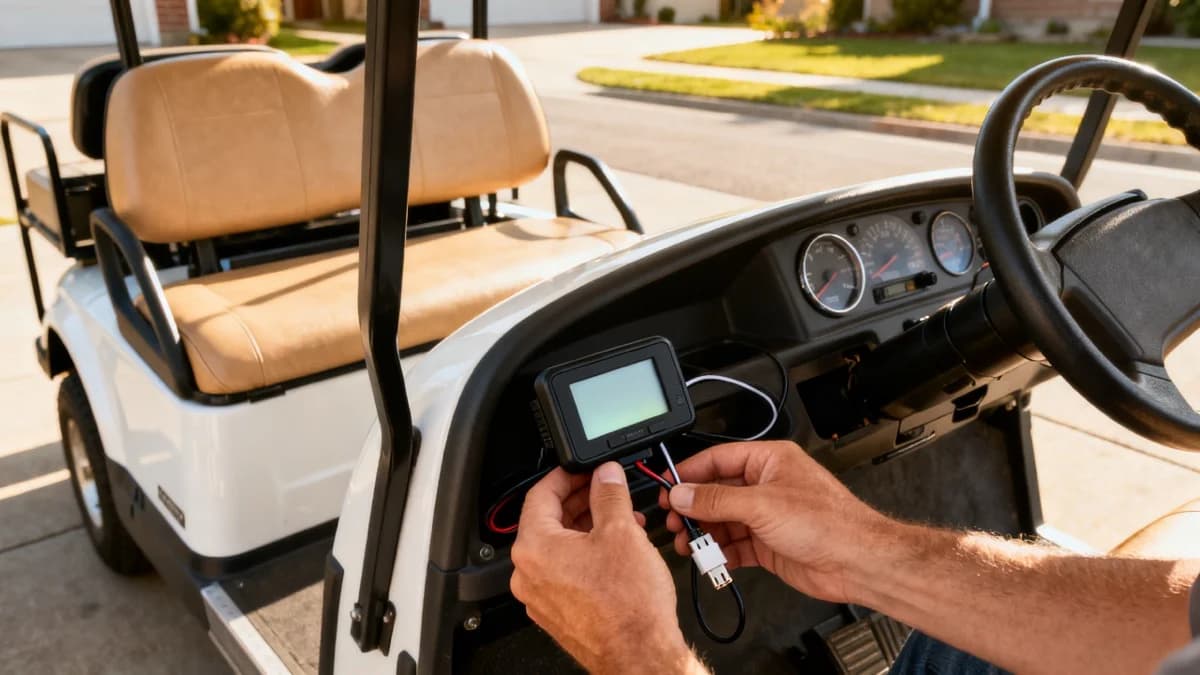
Most plug-and-play GPS speedometers take less than 15 minutes to install. The exact buttons vary by model, but the workflow is similar.
- Pick a visible mounting location
- Clean the dash with isopropyl alcohol
- Route the USB or 12V power cable neatly
- Plug into a USB port, 12V socket, or fused accessory circuit
- Turn the cart on and wait for satellite lock
- Set mph or km/h
- Set an overspeed alert if your model supports it
- Test the display on a short ride
The best location is usually top-center of the dash, low enough that it does not block the windshield. On two-row or lifted carts, test the view while seated in the normal driving position. If the display reflects onto the windshield at night, move it lower or reduce brightness.
If the cart does not already have USB power, install a USB charger through a fused 12V accessory circuit. Electric carts with 36V or 48V packs need a reducer before 12V accessories. Gas carts usually have a 12V starter battery, but you should still fuse the circuit and avoid loose wiring.
How to Install a Panel Gauge Speedometer
A panel gauge looks cleaner but takes more planning. Before cutting, confirm the display diameter, depth behind the dash, power requirement, and whether the gauge needs an external GPS antenna or wheel sensor.
Basic panel-gauge steps:
- Disconnect the main battery pack or turn the cart to tow mode
- Mark the gauge opening with the supplied template
- Check behind the dash for wiring, braces, and clearance
- Cut the opening with the correct hole saw or trim tool
- Mount the gauge and gasket
- Connect fused 12V power and ground
- Mount the GPS antenna where it has sky view, if separate
- Reconnect power and test before reinstalling trim
Do not guess on power. If the gauge says 12V, give it 12V. A 48V pack can instantly damage a 12V display, just like it can damage LED light kits, turn signal kits, speakers, USB ports, and other accessories.
If you are not comfortable cutting the dash, ask a local golf cart repair shop to install it while they are already handling lights, mirrors, or other street-legal equipment.
How to Install a Wheel-Sensor Speedometer
Wheel-sensor speedometers are more involved because the sensor has to read the magnet every wheel rotation. Poor alignment causes jumping speed readings, zero speed, or random dropouts.
The usual setup looks like this:
- Mount the magnet to a wheel hub, brake drum, or other rotating part
- Mount the sensor to a fixed bracket close to the magnet path
- Keep the sensor gap within the manufacturer's range
- Secure the wire away from tires, suspension movement, and steering parts
- Enter tire circumference or wheel diameter into the display
- Test at low speed and recheck the mount after the first ride
Measure actual tire circumference by rolling the cart one full tire rotation on flat pavement and marking the distance. Do not rely only on sidewall size. Golf cart tire sizing can vary, and a worn tire may not match the advertised diameter.
Wheel sensors are worth the effort when you want an odometer for maintenance intervals, rental fleet tracking, or repeated low-speed operation where GPS lag is annoying. For most private owners, GPS is simpler.
Golf Cart Speedometer Accuracy and Calibration
No speedometer is perfect, but you can get close enough for golf cart use with a few checks.
For GPS:
- Give the unit a minute to lock satellites before judging accuracy
- Compare the display against a phone app on a straight open road
- Expect a short lag during hard acceleration or braking
- Move the unit if the windshield frame blocks signal
- Use the overspeed alert as a reminder, not as legal proof
For wheel sensors:
- Measure real tire circumference
- Recheck after changing tire size or pressure
- Inspect the magnet and bracket after rough rides
- Keep sensor wiring away from moving parts
- Compare against GPS over a measured mile
If your cart suddenly reads faster or slower after new tires, the speedometer is not necessarily broken. Taller tires can increase actual road speed at the same motor rpm, which is why a speedometer is useful after lift kits, controller changes, and tire swaps. Our golf cart tire size chart and speed upgrade guide explain that relationship in more detail.
Golf Cart Speedometer Troubleshooting
Most speedometer problems come down to power, signal, mounting, or calibration.
Display does not turn on
Likely cause: No USB or 12V power
Fix: Check fuse, port, reducer output, and ground.
GPS shows zero speed
Likely cause: No satellite lock
Fix: Move outside, wait longer, or relocate the antenna or display.
Speed jumps around
Likely cause: Weak signal or loose mount
Fix: Move the display, secure the mount, and avoid windshield glare spots.
Odometer seems wrong
Likely cause: GPS lock delay or tire calibration error
Fix: Compare with measured distance and reset calibration.
Unit resets every ride
Likely cause: Power wired to switched circuit or weak connection
Fix: Use the correct memory wire if provided, then check ground.
Reads too fast after tire change
Likely cause: Wheel sensor not recalibrated
Fix: Re-enter tire circumference.
Hard to read in sun
Likely cause: Poor display angle or brightness
Fix: Tilt the display, lower the mount, or choose auto brightness.
If the speedometer problem appears at the same time as acceleration issues, surging, or a cart that will not reach normal speed, the gauge may not be the root cause. Start with the drivetrain and electrical basics in our golf cart troubleshooting guide, then check the speed sensor guide if your cart uses a motor speed sensor.
Which Golf Cart Speedometer Should You Buy?
Buy a phone mount and use an app if you want the lowest cost or only need speed checks during testing. Buy a GPS HUD if you want the easiest permanent speedometer for everyday driving. Buy a panel-mount gauge if you care about a clean dashboard and are comfortable with wiring. Buy a wheel-sensor gauge if odometer accuracy matters more than install simplicity.
For most private owners, I would start with a GPS HUD. It gives you speed, trip distance, and overspeed alerts without brand-specific parts or tire calibration. Add a secure phone mount if you also use your phone for maps, music, or backup GPS.
The only option I would avoid is guessing. If your cart has been modified, lifted, or converted for street use, a speedometer is cheap insurance against driving faster than you realize.
Frequently Asked Questions
What is the best speedometer for a golf cart?
For most owners, a plug-in GPS speedometer is the best choice because it does not need wheel sensors or brand-specific wiring. A phone app is cheapest, a GPS HUD is easiest, and a wired panel gauge looks the cleanest once installed.
Can I use my phone as a golf cart speedometer?
Yes. A GPS speedometer app works well for casual driving, testing top speed, and checking whether a modified cart is staying within a local limit. Use a secure phone mount, keep the screen visible, and remember that phone GPS can lag when trees, buildings, or tunnels block satellite signal.
Do golf carts need a speedometer to be street legal?
Some states and local ordinances require a speedometer or odometer, while others focus on lights, mirrors, seat belts, windshield, horn, VIN, registration, and insurance. Check your state and city rules before buying parts. New Mexico, for example, lists a speedometer and odometer in its neighborhood electric car equipment requirements.
Is a GPS speedometer accurate on a golf cart?
A GPS speedometer is usually accurate enough for golf cart use once it has a clear satellite lock. It may lag for a second during hard acceleration or under heavy tree cover. Wheel-sensor gauges can be more consistent at low speeds, but only when tire size and sensor spacing are calibrated correctly.
How much does a golf cart speedometer cost?
Phone apps can be free or a few dollars. Plug-and-play GPS HUDs usually cost $20 to $70. Dedicated golf cart panel gauges are commonly $60 to $220 depending on display size, waterproofing, odometer functions, voltage readout, and whether they use GPS or a wheel sensor.
Can I install a speedometer on an EZGO, Club Car, or Yamaha?
Yes. GPS speedometers are universal and work on EZGO, Club Car, Yamaha, Star EV, ICON, Evolution, Advanced EV, and most other brands. A wheel-sensor or dash-panel gauge may need brand-specific mounting, but the speed reading itself can still work on almost any cart.
Do I need a voltage reducer for a golf cart speedometer?
You need a reducer if the speedometer requires 12V and your electric golf cart has a 36V or 48V battery pack. USB-powered GPS HUDs can run from a USB port or 12V adapter. Never connect a 12V accessory directly to a 36V or 48V pack unless the manufacturer specifically rates it for that voltage.
Where should I mount a golf cart speedometer?
Mount it where the driver can see speed without looking away from the path: top-center of the dash, just below the windshield, or in an unused dash panel opening. Avoid blocking the windshield, cup holders, key switch, forward/reverse selector, or any factory warning labels.
Does a golf cart odometer measure miles correctly?
GPS odometers are usually close on normal rides but can miss small movements before satellite lock. Wheel-sensor odometers can be very accurate after calibration, but a tire size change can throw them off. For maintenance tracking, either type is better than no odometer at all.
What speed should a street legal golf cart show?
Low-speed vehicles are generally built for more than 20 mph and not more than 25 mph under federal LSV rules, but road access and equipment requirements vary by state and city. Use the speedometer to confirm your cart is not exceeding the local limit.
Golf Cart Search
Find the Best Golf Carts of 2026
Compare top-rated models, read expert reviews, and find the perfect cart for your needs.